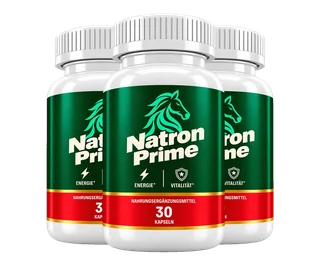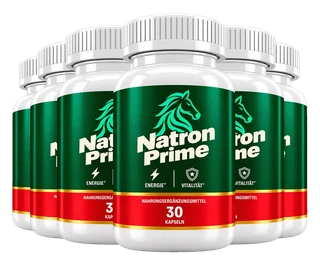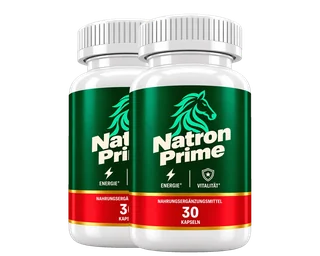
To order NatronPrime Capsules, open the seller's page through the order link, choose a pack, read the full total, pay by card and keep the confirmation email with your order ID. We could not read a live checkout on November 28, 2026, so this page gives a careful routine and not a screen-by-screen tour. Use it as a checklist and trust the live page where it differs.
How do you order NatronPrime Capsules?
You order NatronPrime Capsules on the seller's own page, reached through the order links on this site, by choosing a pack and completing the seller's checkout. Our order links are sponsored, and the owner's materials say the seller sets the price at the live checkout.
The routine has eight steps, set out below. None of them requires anything unusual, and each one exists to head off a specific problem. If a step cannot be done, because the page does not show the information, stop at that step and ask the order desk rather than pressing on.
- Open the order page.
- Pick a pack.
- Look for the product name and ingredient panel.
- Read the full total.
- Check for extra or recurring lines.
- Pay by card.
- Save the confirmation email and order ID.
- Photograph the bottle panel on arrival.
What should you do before you order?
Before you order, decide which questions you want answered and get them answered in writing. A written reply is the only record you will have later, and an order desk is more likely to answer a short list than a long story.
The owner's materials list +1 (302) 200-3480 and [email protected] for orders, tracking, changes and refunds. Our order desk questions page builds a message covering ingredients and amounts, price, shipping, the guarantee start and the returns address. If you take regular medicines, ask a pharmacist about the product now, not after it has arrived, because the ingredient list is not confirmed in the materials we have.
Which pack should you pick?
Pick the pack that matches how sure you are, not the one that looks largest. The owner's images show 2, 3 and 6 bottle packs, each bottle holding 30 capsules, which at one capsule a day (the owner's badge wording) covers 60, 90 and 180 days by our arithmetic.
The 30-day guarantee the owner describes is shorter than every pack's supply, and the start date of those 30 days is not stated, so confirm the live terms with the order desk. Our packages page has a table and a planner that turns a start date into a run-out date. We saw no 1-bottle listing, although one owner-supplied review mentions one bottle.
What should the product page show before you pay?
The product page should show the product name, the number of bottles and an ingredient panel. We could not see the live page, so we cannot say whether it does, which is exactly why this check comes before the payment step.
Look for the name NatronPrime Capsules or the bottle's own “Natron Prime” wording, and for a panel that names its ingredients and amounts. FDA describes a Supplement Facts panel as listing serving size, amount per serving and ingredients.1 If the page shows no panel, ask the order desk for the full ingredient list in writing before paying. The bottle photos we have show no panel at all, which our supplement facts page explains.
How do you read the full total?
Read the full total as a sum of lines, and make sure you can name every line. The number charged should include the product, shipping, taxes and any duties that apply to your address.
- Shipping: is there a line for it, and what delivery time does it quote?
- Taxes: are they included or added at the last screen?
- Duties and import charges: who pays them if the parcel crosses a border?
- Currency: which currency is shown, and does your card add a conversion fee?
- Pack: does the bottle count match the pack you chose?
The owner's pack mentions an EU / DE checkout path and asks that the live cart shipping rule be confirmed, while the desk and its addresses are in the United States. So ask where the order ships from and to which countries. Our pricing page shows how to turn a final total into a cost per day.
What extra or recurring lines should you look for?
Look for any line you did not choose: an add-on, a pre-ticked box, a warranty, a membership or a recurring order. We saw none, but we could not read a live checkout, so that is an absence of evidence and not a guarantee.
| Line you might see | What to do |
|---|---|
| A pre-ticked add-on or extra bottle | Untick it unless you want it |
| A recurring or “auto-ship” order | Decline it, or ask the order desk for the cancel rule first |
| A membership or club offer | Read the terms and the end date before agreeing |
| A fee with no name | Ask the order desk what it is before paying |
| A total that changes on the last screen | Stop and ask why |
If the page offers a code box, enter only a code from the seller itself. We found no discount, coupon or promo code, and our discount page explains what to watch out for.
How should you pay?
Pay by card, because a card gives you a record and, usually, a way to dispute a charge. Avoid wire transfers, gift cards and crypto for a first order, since those leave you little recourse if something goes wrong.
Check the address bar before you enter any card detail, and enter it only on the seller's checkout page. Do not send card numbers by email or message, and do not give them to a page that reached you through an advertisement you cannot trace. If the checkout asks for more than a card, a name and a shipping address, ask why. The order desk, not this website, handles anything to do with a payment, and the website email cannot see orders.
What should you keep after you order?
Save the confirmation email, the order ID and a screenshot of the final total. The order ID is what the owner's claim steps ask for, so keep it as carefully as a receipt. Without it, the order desk has no quick way to find your order, and a call or an email takes longer.
The owner's pack says tracking arrives in the order email, so check that email, including the spam folder. Write down the date of purchase and the date the parcel arrives, because the owner's materials do not say when the 30-day guarantee window begins. If you need to use the guarantee, the owner's materials say to call +1 (302) 200-3480 with the order ID; confirm the live terms with the order desk first. Our guarantee and refund pages list the claim steps and the gaps.
What should you do when the parcel arrives?
When the parcel arrives, check the bottle count, photograph the front label, the bottle panel and the base, and read the panel before you take a capsule. The owner's pack names the bottle panel as the source of truth when the bottle arrives, so it outranks any page.
The front label we have seen reads “NAHRUNGSERGÄNZUNGSMITTEL” and “30 KAPSELN”, which means dietary supplement and 30 capsules. If the panel is missing, or the bottle looks different from the photos described on our label page, stop and write to the order desk. Follow the directions on the label and take no more than it says. If anything seems wrong afterward, stop, speak to a clinician or pharmacist, and report the problem to FDA through MedWatch.2 FDA also states that makers are responsible for their products and labels.3
What is the next step?
The next step is to open the seller's page and walk through the eight steps above, pausing at any one you cannot complete. If the page still shows no live checkout, wait and try again later rather than using a different route.
You can go to the seller's page when you are ready. If you want to know where else to look and what to avoid, our where to buy page covers seller checks.
Questions people ask
How do I order NatronPrime Capsules online?
Open the seller's page through the order link, choose a pack, read the full total, pay by card and save the confirmation email with the order ID. We could not read a live checkout, so trust the live page where it differs.
What should I check before I pay for NatronPrime Capsules?
Check the product name, an ingredient panel, the full total with shipping, taxes and duties, any extra or recurring line, and the guarantee wording. Ask the order desk for anything that is missing.
Can I order NatronPrime Capsules by phone?
The owner's materials list +1 (302) 200-3480 for orders, tracking, changes and refunds. Ask the order desk whether phone orders are taken, and keep a written record.
What do I do after I order NatronPrime Capsules?
Save the confirmation email and order ID, and check the order email for tracking. When the bottle arrives, photograph the panel before you take anything.
Do NatronPrime Capsules orders renew automatically?
We saw no recurring line, but we could not read a live checkout. Look for any recurring or pre-ticked item and ask the order desk before you pay.
Sources for this page
- FDA: Dietary Supplement Labeling Guide, Chapter IV. Nutrition Labeling. www.fda.gov
- FDA: MedWatch, the FDA Safety Information and Adverse Event Reporting Program. www.fda.gov
- U.S. Food and Drug Administration: Dietary Supplements. www.fda.gov
These statements have not been evaluated by the Food and Drug Administration. This product is not intended to diagnose, treat, cure, or prevent any disease. Safety: NatronPrime Capsules are a dietary supplement, not a medicine. We could not confirm any ingredient or amount, so ask your doctor or pharmacist before using them, especially with heart, blood pressure, kidney or liver conditions, nitrate, blood pressure or diabetes medicines, or a low-sodium diet. Some men's-category supplements have been found to hide drug ingredients (FDA). Take no more than the label says, keep the bottle away from children and pets, and report problems to FDA MedWatch. NatronPrime is an independently run information site about NatronPrime Capsules; the owner states it is a licensed U.S. retail desk for NatronPrime, and we have not verified any licence. It is not the maker. We may earn money when you order through links marked as sponsored. The seller sets prices, shipping and refund terms; we could not read a live price, so confirm everything at the live checkout.